Scaling Space#
Scaling space sadly is not possible within a single node or Material function within UE5s material graph, as it would require passing the signed distance field as a function into the scaling node. However, the technique can still be performed though in a slightly awkward way.

In order for the scaling to work correctly, one needs to:
- Divide the space by the desired Scale
- Calculate the signed distance field function that needs to be scale using the divided space
- Multiply the resulting signed distance field by the scale to keep the distance values correct
In order to do this for more complex shapes, I recommend to use named reroute nodes, this keeps the process a lot more tidy.

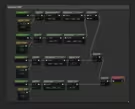
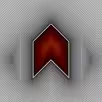
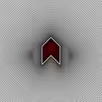
This change allows plugging in a more complex signed distance field like the Chevron SDF in the above figure and still keeps the authoring of the distance field comparatively simple. When using multiple scaled spaces naming becomes more crucial than in this example. The results of this technique are shown in the following figures for half and regular scale.
* The examples here can also be found in the Materials/Samples/Techniques folder in the plugin